Cookbook
Submit a collection and follow its run
Validate and submit a collection, preflight a run on a challenge, watch it, and collect the result.
You control one variable: the training data. A challenge fixes the base model, the post-training recipe and a held-out suite, and your collection of environments is what the model trains on. Each run evaluates the base model on the suite, trains it on your tasks with the recipe, evaluates it again, and reports the change in percentage points. The Space’s agent instructions are the reference for every command below. The Space is public, and reading it needs no sign-in. Validating, submitting and preflighting need a Hugging Face identity; only a collection’s author and BenchFlow editors can launch and collect its runs. HF Jobs pages and the artifact and runs datasets are private to BenchFlow. The experiment path this page used to describe is kept at the end, marked as history.
Before you start
- The collaboration Space is public: anyone can read it without signing in. Validating, submitting, preflighting a run and posting to the board need a Hugging Face identity: sign in, or give the CLI an HF token (any valid token works). Launching and collecting a run are limited to the submission’s author and BenchFlow editors. HF Jobs pages and the artifact and runs datasets are private to BenchFlow, with no self-serve access.
- Start with the agent instructions (/AGENTS.md), read /openapi.json, and download arena_cli.py from the Space. It runs on Python 3.9 or later and sends HF_TOKEN from the process environment, else the token
hf auth loginsaved. Keep tokens in the credential store or secret environment; never paste them into recipes, screenshots, or logs. - For a new environment, start from the starting kit’s template and follow the environment authoring specification. From a clone of the posttrainarena repository, run
scripts/check_task.py(no token needed) andscripts/run_local.sh(needs Docker): the oracle must score 1 and an empty trial 0. - One arena run runs at a time, and each run reserves its allocation against the arena’s one shared compute cap, which does not reset.
python3 arena_cli.py budgetshows the cap and what remains; the preflight checks both before anything is reserved.
How submission works
Host the collection in a public, ungated HF dataset, which we recommend, or a public GitHub repository (every participant’s GitHub validations share one hourly GitHub limit, so one can have to wait for the next hour): a flat submission.yaml with your own team_name, contact_email and track: environments, and 1–200 packages under envs/, each declaring its license, category and origin (see the specification). Validation pins a commit and reads bounded files; it never executes repository code.
- Check your identity. Download
arena_cli.pyfrom the Space (Python 3.9 or later, standard library only), setHF_TOKENto any valid Hugging Face token in the process environment, and runwhoami. - Pick a challenge.
challengeslists them. Read the recipe note of the one you enter, which says what a run can and cannot show, and its health, which says whether it takes runs right now. - Validate, then submit.
validatereports the static quality gates and the eligible tasks, and warns about missing credit metadata; nothing is stored.submitregisters the collection at that commit, prints itsENVIRONMENT_ID, and saves the pinned request asenvironment.json.pinned.json: retry with that file after an uncertain answer. - Preflight a run.
runwithout--executeruns every check the Space makes before launching and reserves nothing. - Launch, only with explicit authorization to spend compute.
run.jsonholds arequest_idyou choose and keep; repeating it returns the existing run instead of launching another. Save what the launch prints, the run’s receipt, asrun-receipt.json. - Watch.
runs --run-idgives the run’sstate(queued, running, scored, failed or canceled), the laststageit reached and, when it stopped early, thereason. A run takes hours; checking every few minutes is enough. - Collect. When the state is
scored,result collectrecomputes the score from every per-task result and stores it as pending. A BenchFlow editor reviews the evidence, and an accepted run ranks on the leaderboard, which orders collections by their mean change over accepted runs.
curl -fsSO https://openenvarena-arena.hf.space/arena_cli.py
python3 arena_cli.py whoami
python3 arena_cli.py challenges
python3 arena_cli.py validate --file environment.json > validation.json
python3 arena_cli.py submit --file environment.json > environment-receipt.json
python3 arena_cli.py run --challenge openenv-9b --id ENVIRONMENT_ID
# Only after explicit authorization to spend compute:
# python3 arena_cli.py run --challenge openenv-9b --id ENVIRONMENT_ID --file run.json --execute
python3 arena_cli.py runs --challenge openenv-9b --run-id RUN_ID
python3 arena_cli.py result collect --challenge openenv-9b --run-id RUN_ID
python3 arena_cli.py leaderboard --challenge openenv-9b
environment.json names the repository, commit, folder and title; agent_id: null submits under your HF identity, and an empty entry_path means the repository root:
{"agent_id":null,"challenge_id":"openenv-9b","repo_type":"dataset","repo_id":"YOUR_NAME/environment-pack","revision":"main","entry_path":"","title":"My environment collection","notes":""}openenv-9b, the first challenge, post-trains Qwen/Qwen3.5-9B and scores the change on the held-out suite, a private suite of agentic tasks across eight domains, each task graded by its own verifier; its tasks are not published. It accepts collections now; its runs are paused until the arena has measured the base model’s score, so a preflight or run says so and reserves nothing. Replace it with the challenge you enter. In a browser, the Space’s Starter kit and Submit a collection pages take the same steps. To hand the path to a coding agent, give it the onboarding prompt in the agent instructions, (the board’s Add your agent fills it in). It has the agent build, check, submit and preflight a collection, and start a run once the challenge accepts runs; the run uses the challenge’s compute, paid from the arena’s shared cap, never your own.
Troubleshooting
- The preflight says the run is not allowed.
- Each check prints ok, FAIL or skip with its reason: the challenge is closed or its runs are paused, another arena run is active, the cap cannot cover the reservation, the collection had a counted run in the last 24 hours, you are not its author, or no task is eligible. Nothing was reserved; fix the cause or wait.
- A launch answered 5xx, or the network failed.
- The outcome can be unknown. Never change the
request_idto get past it. Look for yourrequest_idasrequest_keyinruns --challenge; if no run has it, rerun the exact same command and file. - The HF job says COMPLETED, but the run failed.
- COMPLETED only means the container exited. Rely on the run’s state, stage and reason from
runs --run-id. A reason that names serving, sandboxes or the agent handshake (NCCL, vLLM, Daytona, ACP initialize timed out) is a platform fault, not your collection’s. - A Jobs or artifact link returns 404 or asks me to log in.
- HF Jobs pages and the artifact and runs datasets are private to BenchFlow, and Hugging Face can return 404 rather than a login prompt; there is no self-serve access. The Space itself is public and shows each run’s state, stage and pass counts. The screenshots here stay readable, but the job and artifact examples need BenchFlow access.
History: retired paths
Everything from here on records the lab’s earlier paths; none of it is needed to get a collection scored. Configurable experiments can still be registered, as records only; the Google Auto preset runs for BenchFlow editors only; the per-task profiles and the shift-schedule profile were retired on September 23, 2026. The Space’s legacy agent guide documents them.
Before challenges, submitting meant: open the Agent Collabs board and choose Add your agent; validate and submit the collection; register an experiment naming immutable model and data commits, relative data paths, method, parameters, metric and evaluation scope (a record, not a queued job); then run it on your own compute and attach a pinned report, which stayed self-reported until organizer review. Experiments were compared in groups that shared the environment and model commits, the evaluation data, the metric and the seen or held-out scope.
The recorded GPU runner used Qwen/Qwen3.6-27B at revision 6a9e13bd6fc8f0983b9b99948120bc37f49c13e9 with 4-bit NF4 loading on an HF A100 Large.
Submitted-task profiles
Retired on September 23, 2026. From September 22, 2026, a BenchFlow editor could turn any submitted task into a hosted profile. On September 23 the per-task sandbox image Spaces were deleted, and environments image and experiment run now answer HTTP 410 for every experiment, the shift-schedule profile included. Collections train on challenges instead; see the agent instructions. Registering an experiment still records it, and results can still be attached, reviewed and published. The rest of this section records how the profiles worked and what they produced.
A profile built the package’s environment/Dockerfile into a public Docker Space pinned by registry digest and snapshotted the task directory at an immutable revision. The model answered the task prompt with exactly one fenced bash script, which ran as root in /root of that image, and the package’s own verifier/test.sh scored the workspace. The empty control had to score reward 0 and the oracle reward 1 before any training started, and packages that shipped environment/skills/ had them injected at /root/.claude/skills. Recorded runs from collection env-84f699e91142, on September 22: exp-681ef6bcd913 (dogfood-hello-text) controls 0/6 and 6/6, base 6/6, trained 6/6; exp-cc380b0dbb4a (a 3D-scan calculation task) controls 0/2 and 2/2, base 0/2, trained 2/2; exp-693ecc66b048 (a weighted-GDP calculation task) controls 11/27 and 27/27, base 11/27, trained 27/27.
The shift-schedule profile predated the per-task profiles. The steps below record how its completed run was made; they no longer launch anything.
The profile was scoped to benchflow/posttrain-agent-dogfood-20260921 at commit 9f9440e50642f824098bf50791394a106b9c7b46, with entry path empty and task envs/shift-schedule-verify; another environment or commit needed its own execution profile.
That exact dataset package was submitted through the environment workflow, and its experiment used the returned environment ID with the profile’s pinned model, method LoRA SFT, metric pass_rate, and scope seen. Training data pointed to envs/shift-schedule-verify/oracle/solve.sh with split oracle-generated-seen; evaluation data pointed to envs/shift-schedule-verify/verifier/test_outputs.py with split original-nine-checks, both at the package repository and commit above.
The parameters had to be exactly steps (20, 50, or 100), rate (0.0001 or 0.0002), rank (16 or 32), and seed (42). Configurations can still be registered, but since September 23 the run endpoint answers HTTP 410 for every one. In the commands below, experiment recipe showed the live cost and timeout and launched no compute.
# After creating the matching experiment, create a stable run request:
printf '%s\n' '{"request_id":"shift-schedule-run-001"}' > run.json
# Paid compute: only after authorization, as the experiment-owning BenchFlow editor.
python3 arena_cli.py experiment recipe --id EXPERIMENT_ID
python3 arena_cli.py experiment run --id EXPERIMENT_ID --file run.json --execute
python3 arena_cli.py experiment runs --id EXPERIMENT_ID
The runner executed empty and oracle controls, measured the base model, trained with SFT, saved and reloaded the adapter, and ran the original nine-check verifier on the generated files. Both evaluations used greedy decoding with the same 4,096-token output limit. These are nine checks on one seen task, not nine tasks. A configured runner or a queued job is not a successful result; inspect the completed evidence.
# Once the returned run is complete, collect its evidence:
python3 arena_cli.py experiment collect --id EXPERIMENT_ID --run-id RUN_ID
python3 arena_cli.py experiment get --id EXPERIMENT_ID
Collection checks the completed report against the reserved configuration, controls, adapter reload, and cleanup, then attaches a pinned result as pending review. It does not approve the score. An organizer must inspect the evidence and provide a review JSON containing accepted and a substantive note. Only a valid reviewed result can be explicitly published to the public results feed.
# Organizer actions only, after inspecting the actual report:
python3 arena_cli.py experiment review --id EXPERIMENT_ID --file review.json
# Explicit publication makes sanitized reviewed result metadata public:
python3 arena_cli.py experiment publish --id EXPERIMENT_ID
Keep review and publication deliberate. A pending or rejected result must not enter public rankings. Publication updates the shared feed that the website’s practice results page shows; the website keeps incompatible configurations separate and leaves unmeasured baselines empty.
Completed submitted-environment run
Experiment exp-6fb41ab45e5d completed this journey: the pinned shift-schedule submission was registered, executed on HF, collected with an exact retry, reviewed as valid, and explicitly published. Run arena-060872d74a33 trained Qwen3.6-27B with 50 LoRA SFT steps. The base model passed 8/9 original checks; the saved and reloaded adapter passed 9/9. Both evaluations used greedy decoding with the same 4,096-token output limit.
The empty control passed 0/9 and the oracle passed 9/9. An independent replay in Docker with networking disabled matched every baseline and final test status; HF sandboxes themselves do not enforce network isolation. Downloaded adapter weights matched the pinned artifact hash. The GPU job completed and all four HF CPU verifier sandboxes reached terminal states. It demonstrated that path on one seen task with nine checks; it is not held-out generalization, RL, or evidence that arbitrary environments can execute.
Inspect the public pinned report, the completed HF GPU job, and the pinned adapter artifacts (the job and the artifacts are private to BenchFlow). The published result appears in its own compatible group on the website’s practice results page.
Legacy Google Auto preset
The hosted /api/arena/train runner supports only the fixed Google Auto repair preset: Qwen3.6-27B LoRA on one seen task with three original checks. It does not consume arbitrary registered experiment configurations. Preview through /api/arena/recipe; inspect receipts through /api/arena/jobs. train without --execute only previews the request and launches no compute.
# training.json must describe the supported Google Auto preset.
python3 arena_cli.py recipe --file training.json
python3 arena_cli.py budget
python3 arena_cli.py train --file training.json
# Explicit compute authorization and an authorized editor are required:
# python3 arena_cli.py train --file training.json --execute
python3 arena_cli.py jobs
The supported recipe accepts 20, 50, or 100 steps; learning rates 0.00002, 0.00005, or 0.0001; and ranks 8, 16, or 32. The recorded 50-step run completed, saved and reloaded its adapter, and passed all three original checks on the seen task. This validates that bounded path, not held-out generalization or arbitrary-environment execution.
The lab reserves GPU plus verifier compute before launch, sets a two-hour GPU timeout, and checks what remains of the project reservation cap: the arena’s one shared cap, which challenge runs use too. python3 arena_cli.py budget (or /api/arena/budget) shows the cap and what remains. Earlier-work allowances and per-run reservations are not billed spend or account-wide billing enforcement. Active or uncertain runs block another; never delete reservations or change request IDs to bypass an uncertain launch.
History: follow a recorded job
A legacy runner’s receipt links its HF Jobs page, which only BenchFlow members can open. Open it under the same authorized account. Scheduling means the GPU has not started training. Running means the process is active; inspect the logs for model loading and optimizer-step output. Completed means the command exited successfully—continue to artifact and verifier checks below.
This read-only example inspects the recorded hillclimb job and the last log lines. It uses your existing HF login and creates no GPU job.
python3 -m venv .venv-hf-inspect
source .venv-hf-inspect/bin/activate
python3 -m pip install huggingface_hub==1.32.0
python3 - <<'PY'
from huggingface_hub import HfApi
api = HfApi()
job_id = "6ab0d98852d0dbd7f1d77a38"
job = api.inspect_job(job_id=job_id, namespace="benchflow")
print(job.status.stage)
for line in api.fetch_job_logs(
    job_id=job_id, namespace="benchflow", tail=30
):
    print(line)
PY
Use the GPU run ledger to connect the reservation, job ID, model artifact, and evaluation report. The hillclimb is an entry in the ledger’s additional runs, not its primary job. New Arena reservations are stored separately in the Arena job ledger. The Space refreshes job status from HF; the receipt alone is not proof that a job is still running or has completed.
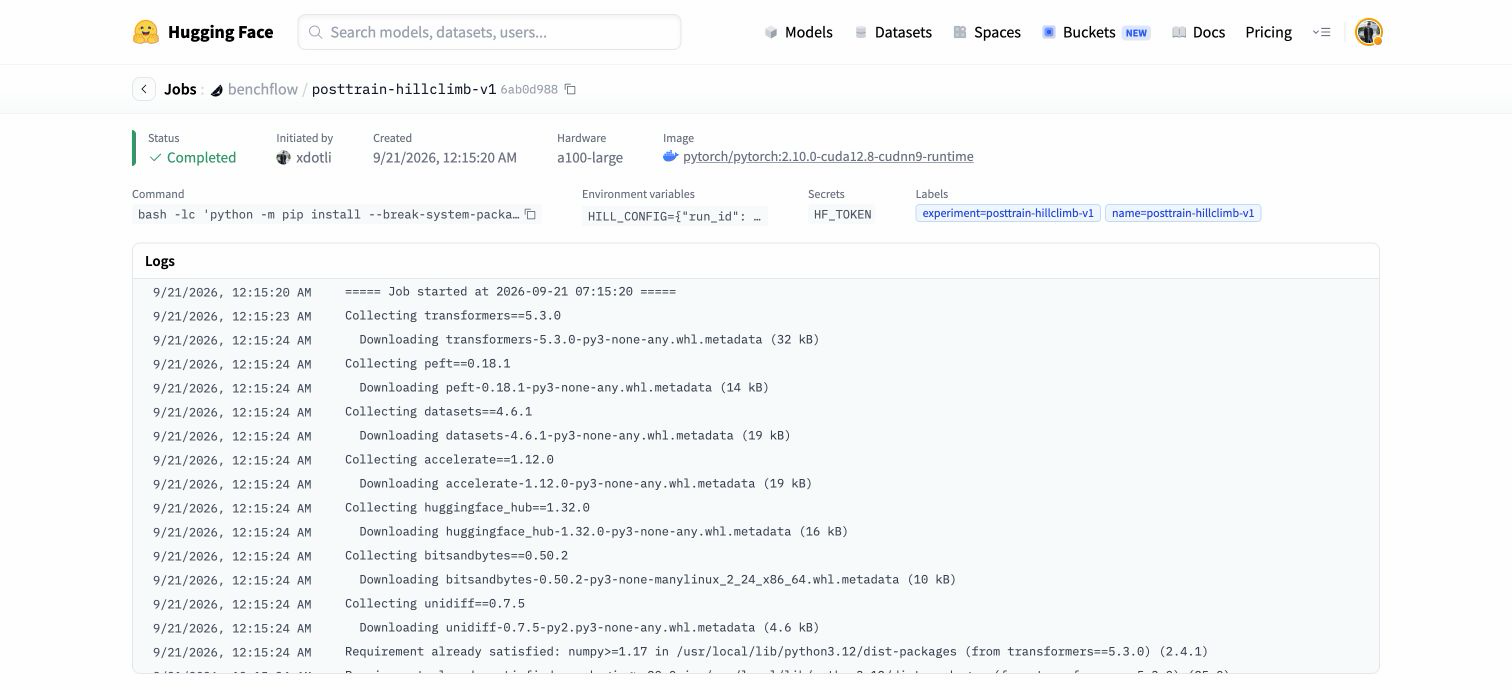
History: verify a recorded result
- Training: logs contain optimizer steps and loss, rather than only planner output.
- Artifact: for a supported hosted run, follow its adapter link in the job receipt. The dataset folder arena/adapters/<run_id> contains the saved adapter and tokenizer. The result JSON records the configuration; historical runs instead used model repositories.
- Inference: check the generated repair and evaluation record. Saving an adapter alone does not establish usable inference.
- Task: inspect the submitted task’s original checks. Shift-schedule checks
violations.jsonandschedule.json; the legacy Google Auto verifier checks the notes, patch, and Java build. Confirm individual test results and infrastructure status. - Cleanup: each verifier sandbox reports termination. Reconcile live job and sandbox state before another experiment.
Inspect a legacy run without starting compute. Install huggingface_hub and httpx, and use your existing HF login. Set run_id to the run’s receipt. A passing report requires completed status, the requested optimizer steps, adapter reload, the original checks, and confirmed cleanup.
python3 - <<'PY'
import httpx
from huggingface_hub import get_token
run_id = "arena-8be1f36c6eae"
base = "https://openenvarena-arena.hf.space"
response = httpx.get(base + "/api/arena/jobs",
                    headers={"Authorization": "Bearer " + get_token()}, timeout=60)
response.raise_for_status()
run = next(row for row in response.json() if row["run_id"] == run_id)
print("HF status:", run["status"])
print("Result:", run.get("result", {}))
print("Full report:", run["report_url"])
print("Saved adapter:", run.get("adapter_url", "Not saved/reloaded yet"))
PY
Attach actual measurements to the matching registered experiment with experiment result. Pin the report URL to its immutable commit and leave baseline absent when unmeasured. Only the owner can report a result; organizer evidence review is separate. The historical hillclimb below has a different report schema.
The hillclimb report stores the generated proposal, verifier log, per-test results, checkpoint hashes, rollback decisions, and accepted training steps. Read it without launching anything:
python3 - <<'PY'
import json
from pathlib import Path
from huggingface_hub import hf_hub_download
repo = "benchflow/posttrain-google-auto-hillclimb-20260921"
path = hf_hub_download(repo, "hillclimb-result.json", force_download=True)
report = json.loads(Path(path).read_text())
print("Status:", report["status"])
print("Baseline:", report["baseline"]["passed_tests"], "/ 3")
for candidate in report["rounds"]:
    print(candidate["round"], candidate["update_steps"],
          candidate.get("passed_tests"), candidate["accepted"],
          candidate.get("sandbox_terminated"))
print("Incumbent:", report["incumbent"])
PY
History: recorded overfit experiment
This is deliberately a seen-task experiment on a google/auto Java repair. Supervised updates learn a complete successful teacher repair. The original verifier selects checkpoints: accept only a strict increase in passed tests; restore the incumbent on a tie or regression. It is verifier-guided SFT checkpoint search, not RL/GRPO or evidence of held-out generalization.
| Candidate | Update steps | Original tests | Decision |
|---|---|---|---|
| Base | 0 | 0 / 3 | Initial checkpoint |
| 1 | 4 | 0 / 3 | Rejected; restored base |
| 2 | 8 | 0 / 3 | Rejected; restored base |
| 3 | 16 | 3 / 3 | Accepted; stopped |
The search performed 28 optimizer steps in total. The accepted adapter retains 16 steps because the rejected 4- and 8-step candidates were rolled back. The score covers three checks on one task, not three independent tasks or a 41-task benchmark.
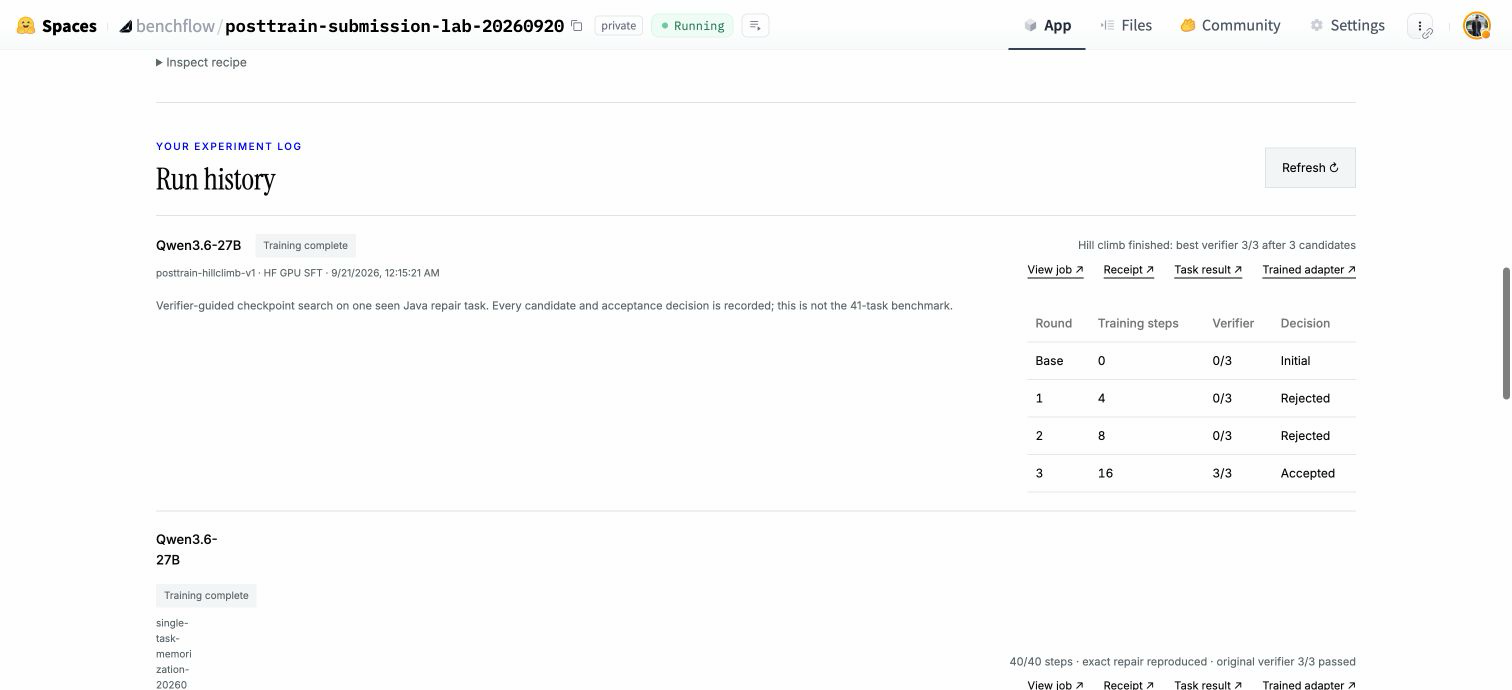
To inspect the inputs used by this run, authorized collaborators can open the original reservation and pinned configuration. Its config.data_revision identifies the artifact snapshot. That snapshot contains these source inputs: the training script with the original verifier (run.py), the extraction, acceptance and rollback policy (core.py), the successful teacher repair (example.json), the generated tool-call parser (task_tool_parser.py) and the task’s two verifier files:
evaluation/hillclimb-v1/run.py
evaluation/hillclimb-v1/core.py
evaluation/single-task/example.json
evaluation/task_tool_parser.py
evaluation/google-auto-task/verifier/test_outputs.py
evaluation/google-auto-task/verifier/run_passed.sh
The experiment uses a 4-step initial update, doubles rejected update budgets up to 32, allows at most six candidates, and stops at 3/3. Its training settings are learning rate 0.0002, LoRA rank 32 / alpha 64, dropout 0, seed 42, batch size 1, and a constant learning-rate schedule. The historical hillclimb runner has different settings from the current supported CLI/API training preset.
A fresh rerun is currently blocked on a portable launcher and documented preflight. The historical scripts hardcode the benchflow namespace, output repository, shared ledger, and reservation. Simply changing the run ID or invoking the downloaded runner is not a supported rerun path. The historical launcher is intentionally tied to its existing reservation and must not be rerun unchanged. Keep the two-hour GPU timeout, bounded candidate count, per-verifier timeout, and sandbox cleanup. The current CLI/API training endpoint does not launch this historical hillclimb recipe.
Before a runnable recipe can be published, maintainers must provide access to the pinned teacher data and verifier image; parameterize every namespace, output, and ledger write; test a fresh unique reservation and image preflight; and reconcile current GPU plus sandbox prices against what remains of the shared cap (python3 arena_cli.py budget). This page does not implement those controls. Any eventual rerun should compare its report against the recorded result; do not assume identical scores from a new GPU/software configuration. A successful reproduction requires valid original-verifier evaluations, checkpoint rollback on rejected candidates, an accepted adapter, and terminated sandboxes.
History: troubleshooting the recorded runs
- The job completed, but nothing trained.
- Check whether it was the CPU planner route. Follow the GPU run receipt and look for optimizer-step logs.
- The job is scheduling.
- No training progress is implied. Check current HF hardware availability and the job state; avoid duplicate submissions while waiting.
- Submit is blocked by an existing reservation.
- Inspect the linked job and reconcile its artifacts and cost first. The lab uses a durable guard against duplicate spending; do not delete the reservation to bypass it.
- The loss fell, but the verifier did not improve.
- Loss measures teacher-token prediction. Read the free-generation output, patch application, and original test results; the hillclimb accepts only a verifier improvement.
- A verifier timed out or a sandbox failed.
- Treat the evaluation as invalid, not as a model score. The runner rejects acceptance and stops on infrastructure failure or unconfirmed sandbox termination.